
Testing the Different Architectures for SwiftUI Projects
Continuing with our discussion of the two common architectures from our last post MVVM and TCA, we’re going to talk about testing with the different architectures, as well as some of the debugging lessons learned from coding up the sample code.
All of the code for this blog post is in this sample code repo.
Testing
When testing your app, just check business logic. If you’re testing how code that you haven’t written works, you’re doing things incorrectly. For example, just using some out of the box Swift functionality, if you’re writing code to verify the way that, say, UserDefaults work, you’re wasting your time.
If you’re creating a library, by all means, verify that your library works as it is supposed to. But if you’re using a library, just verify your business logic around the library calls. That’s where your time is better spent.
MVVM
One of the things that I really liked about working with MVVM is how easy it was to work with and to test. There wasn’t anything that wasn’t standard Swift involved.
Our sample code shows our snippets in greater detail.
We’ll test the TagView code that we’ve been using in our previous examples:
TagView Testing
Our initializer, defines the text property from the tag property, so that should be tested in our business logic.
// MARK: Initializer
init(_ tag: Tag, editMode: EditMode = .inactive) {
   self.editMode = editMode
   self.tag = tag
   self.text = tag.toString
}
So we add testing for that:
// MARK: - Initializer
func test_init_initializesThingsProperly() {
   let expectedPayload = "2025-07-06"
   let expectedTag = Tag(.due, payload: expectedPayload)
   sut = .init(Tag(.due, payload: expectedPayload),
            editMode: .inactive)

   XCTAssertEqual(sut.tag, expectedTag)
   XCTAssertEqual(sut.text, expectedTag.toString)
   XCTAssertEqual(sut.editMode, .inactive)
}
The bulk of our business logic is our view model’s convertTagIfValid(from:) function.
// MARK: Helper Function
/// Converts into a tag, if valid
/// - parameter from: the text to attempt to convert
func convertTagIfValid(from string: String) {
   guard let convertedTag = string.toTag() else {
      self.text = tag.toString
      return
   }
   self.tag = convertedTag
   self.editMode = .inactive
}
We’ll need to test both paths through this code:
- Our happy path, where the string converts successfully into a
Tagentity. - And our unhappy path, where the string doesn’t convert and the
textTagproperty is reset.
// Our happy path test
func test_convertTag_whenSuccessful_setsEverythingProperly() {
   let tag = Tag("tag")
   let expectedTag = Tag(.due, payload: "2025-07-06")

   sut = .init(tag)
   sut.text = expectedTag.toString
   sut.editMode = .active

   sut.convertTagIfValid(from: expectedTag.toString)

   XCTAssertEqual(sut.tag, expectedTag)
   XCTAssertEqual(sut.text, expectedTag.toString)
   XCTAssertEqual(sut.editMode, .inactive)
   XCTAssertEqual(sut.isEditing, false)
}

// Our unhappy path test
func func_convertTag_whenUnsuccessful_resetsBackToPreviousTagText() {
   let tag = Tag("tag")
   sut = .init(tag)

   // Invalid conversion
   let invalidText = "invalid"
   sut.text = invalidText
   sut.editMode = .active
   XCTAssertEqual(sut.text, invalidText)
   sut.convertTagIfValid(from: invalidText)

   XCTAssertEqual(sut.tag, tag)
   XCTAssertEqual(sut.text, tag.toString)
   XCTAssertEqual(sut.editMode, .active)
   XCTAssertEqual(sut.isEditing, true)
}
This still leverages the older XCTest model, rather than the new Swift testing model. But the big thing is still the old standbys for testing:
- Set up your test environment’s state.
- Optionally, verify the initial state.
- Call the function that you want to test.
- Verify the expectations of how it should change the state.
There are currently two functional tabs in our TaskPaper app: the Tasks and Edit functionality.
TextView Testing
The main functionality of the TextView view model is similar to the TagView. The user enters text into TextEditor SwiftUI via the updatedText(text:) function. Similar to what we saw in the TagView, our testing will need to verify both the happy path and unhappy path. Here, we have an error message added to the UI to indicate to the user when there’s a problem.
// MARK: - Updated Text Conversion Tests
func test_updatedText_whenEmpty_setsExpectedError() {
   sut = .init(from: TMType.Mock.TopLevel.text)

   sut.updatedText(text: "")

   XCTAssertEqual(sut.type, TMType.Mock.TopLevel.text)
   XCTAssertEqual(sut.text, TMType.Mock.TopLevel.text.toString)
   XCTAssertEqual(sut.errorMessage, "Unable to convert <>")
}
An empty string is flagged as something that doesn’t convert.
func test_updatedText_whenMultiple_setsExpectedError() {
   sut = .init(from: TMType.Mock.TopLevel.text)

   sut.updatedText(text: TMType.Mock.TopLevel.project.toString + "\n" +
                   TMType.Mock.Projects.projectWithTasks.toString)

   XCTAssertEqual(sut.type, TMType.Mock.TopLevel.project)
   XCTAssertEqual(sut.text, TMType.Mock.TopLevel.project.toString)
   XCTAssertEqual(sut.errorMessage,
                  "Only the first converted type model is saved. You may need to " +
                  "change indentation to keep them under the proper project.")
}
Our logic is such that only a single TMType model is supported. When more than one is entered, only the first is used, but an error message indicates to the user where the problem might be and how to fix it.
func test_updatedText_whenConverted_setsTextProperly() {
   sut = .init(from: TMType.Mock.TopLevel.text)
   sut.errorMessage = "Invalid"

   sut.updatedText(text: TMType.Mock.Projects.projectWithTasks.toString)

   XCTAssertEqual(sut.type, TMType.Mock.Projects.projectWithTasks)
   XCTAssertEqual(sut.text, TMType.Mock.Projects.projectWithTasks.toString)
   XCTAssertNil(sut.errorMessage)
}
And then lastly, the happy path, where the tag converts properly, the text properties is properly set, and any lingering errorMessage is properly cleared.
The TaskMasterAndDetailView.ViewModel tests are a little more challenging, but the logic is straight-forward. We have the business logic wrapped in a handful of view model functions:
-
addItem(from:)which adds an initial item with an optionalString?value, which allows use to easily convert fromnilor an empty string to a set value, such as"New Item"or the like. -
select(item:)which sets up the state of the view model when the user selects an item from the list. -
process(_:)which handles the business logic to verify and test the various responses from theTaskDetailViewsuch as cancel, delete, or save.
As the view model also holds the state of the Task feature functionality, it makes it even easier to test. A function is called and then the state of the view model is verified against expectations.
As the TaskDetailView has their own local view model that triggers the changes the the TaskMasterAndDetailView.ViewModel’s responseType property, that needs to be tested as well.
MVVM (Combine)
The MVVM (Combine) code is slightly different, due to leveraging the StateBindingViewModel.
Similar to our architecture post, we aren’t going to talk in depth about the MVVM (Combine) but the sample code is present for people that wonder about it. The main changes shift things based upon the state objects and how the StateBindingViewModel requires functionality to leverage it’s binding and access functionality, when setting up tests.
Our sample code illustrates all of these for people that are interested.
TCA
Testing with TCA is a bit more challenging. We need to test things by verifying elements of the TCA flow, either in an exhaustive or inexhaustive flow. With the exhaustive flow, the user tests everything, every element of the flow, as it goes from beginning to end. The inexhaustive flow just tests certain interactions to verify that these parts of the whole, in isolation, work as expected.
Let’s look at things in a little more depth.
Our sample code shows our snippets in greater detail.
TagConverter and TCATagView Testing
The code we’ll be testing is in TCATagFeatureFinalPass.swift which hosts the reducer (TagConverter and the view TCATagView).
Exhaustive tests test and verify each change to the TCA state from an initial state to the end of a specific flow through the app. We current have two flows through the TCATagFeatureFinalPass: successful and not successful.
We could test both a negative flow and a positive flow in the same test, but I’ve always felt a proper unit test will test a specific thing and that alone.
Exhaustive Unsuccessful Path
This will test the flow from beginning to end.
- The user initiating editing by tapping on the static view.
- Once edit mode was initiated, the user entered text.
- When the text is submitted and it does not successfully convert into a
Tag, an error message is presented.
   @Test
   func test_exhaustive_unsuccessfulEditFlow() async throws {
      let expectedText = "tag(payload"
      // Set up
      let store = await TestStore(initialState:
                              TagConverter.State(tag: Constants.MockTag.test)
      ) {
         TagConverter()
      }

      // Walk through the flow
      await store.send(.tapped) {
         $0.editMode = .active
      }
      await store.send(.entered(expectedText)) {
         $0.text = expectedText
      }
      // Invalid text, when submitted, triggers the error flow
      await store.send(.submitted) {
         $0.errorMessage = "Unable to convert <\(expectedText)> into a tag."
      }
   }
Exhaustive Successful Path
This is another beginning to end test, but in this case, it handles a successful text to Tag conversion.
- The user initiating editing by tapping on the static view.
- Once edit mode was initiated, the user entered text.
- When the text is submitted and successfully converted into a
Tag, theeditMode,tag, andtextproperties are replaced.
   @Test
   func test_exhaustive_successfulEditFlow() async throws {
      let expectedTag = try XCTUnwrap("@tag".toTag())
      let expectedText = "@tag()"
      // Set up
      let store = TestStore(initialState:
                        TagConverter.State(tag: Constants.MockTag.test)
      ) {
         TagConverter()
      }

      // Walk through the flow
      await store.send(.tapped) {
         $0.editMode = .active
      }
      await store.send(.entered(expectedText)) {
         $0.text = expectedText
      }
      // Valid text, when submitted, triggers the update flow
      await store.send(.submitted) {
         $0.editMode = .inactive
         $0.tag = expectedTag
         // And verifies the normalized text (which is different than the entered text)
         $0.text = expectedTag.toString
      }
   }
But, unfortunately, that can be a lot of work depending on the feature. Happily, TCA offers inexhaustive tests, where an initial state can be set up and tests will test the change from that state.
In our case, we set the initial state as though the TCA view was already in edit mode, some text had already been entered, and then when submitted, presents an error.
   @Test
   func test_inexhaustive_invalidSubmission_generatesError() async {
      let expectedText = "tag(payload"
      // Set up
      let store = TestStore(initialState:
                        TagConverter.State(Constants.MockTag.test,
                                       editMode: .active,
                                       text: expectedText)
      ) {
         TagConverter()
      }
      store.exhaustivity = .off

      // Verify the submission error flow
      await store.send(.submitted) {
         $0.errorMessage = "Unable to convert <\(expectedText)> into a tag."
      }
   }
Testing With Dependencies
One of the more useful features of TCA testing is the ability to inject dependencies. In our TCATaskFeature, we could have done it this way:
   // MARK: Body
   var body: some ReducerOf<Self> {
      Reduce { state, action in

         switch action {
         case .addButtonTapped:
            state.destination = .addTask(
               TCAAddEditTaskFeature.State(
                  mode: .add,
                  task: TCATask(id: UUID(),
                             task: .init(type: .text("")))
               )
            )

            return .none
   // ...
But if we had, we’d have no idea what the UUID value would be which would make testing difficult. Instead we can inject a dependency:
   // MARK: Body
   @Dependency(\.uuid) var uuid
   var body: some ReducerOf<Self> {
      Reduce { state, action in

         switch action {
         case .addButtonTapped:
            state.destination = .addTask(
               TCAAddEditTaskFeature.State(
                  mode: .add,
                  task: TCATask(id: self.uuid(),
                             task: .init(type: .text("")))
               )
            )

            return .none
   // ...
With this, our code still generates a UUID, but the method can change in our testing. In our test code, we can ensure incremented UUID generation, so that we will be able to have generated UUIDs that conform to our expectations.
   @Test
   func test_subsequentAddItems_haveDifferentIDs() async {
      let initialTask: TCATask = .init(id: UUID(0), task: .init(type: .text("")))
      let addedTask: TCATask = .init(id: UUID(1), task: .init(type: .text("")))

      // Set up
      let state: TCATaskFeature.State = .init()
      let store = TestStore(initialState: state) {
         TCATaskFeature()
      } withDependencies: {
         $0.uuid = .incrementing
      }
      store.exhaustivity = .off

      // Walk through the flow
      await store.send(.addButtonTapped) {
         $0.destination = .addTask(TCAAddEditTaskFeature.State(
            mode: .add,
            task: initialTask
         ))
      }
      await store.send(.addButtonTapped) {
         $0.destination = .addTask(TCAAddEditTaskFeature.State(
            mode: .add,
            task: addedTask
         ))
      }
   }
Testing Challenges
With any sufficiently complex code base, there could be challenges in your testing.
Inadvertent Side Effects
One challenge found had to do with inadvertent state changes due to didSet property functionality. This also illustrates why the differences between TCATagFeatureFirstPass and TCATagFeatureFinalPass were important. The didSet functionality for state properties went against what would typically be expected from TCA code, so they were refactored away.
In our TCATextFeature, I left the didSet functionality in place, which introduced a bug in testing clearly illustrated in variant initializers:
   // MARK: State
   @ObservableState
   struct State: Equatable {
      var text: String
      var task: TCATask {
         didSet {
            text = task.task.toString
         }
      }
      var errorMessage: String? {
         didSet {
            guard errorMessage != nil else { return }

            text = task.task.toString
         }
      }
      var hasError: Bool {
         errorMessage != nil
      }
   }
An initializer was added to set all of the fields, so that we can set up the state as we’d like it for testing:
   init(task: TCATask,
        text: String? = nil,
        errorMessage: String? = nil) {
      self.task = task
      self.text = text ?? task.task.toString
      self.errorMessage = errorMessage
   }
That looks simple enough.
let state = TCATextFeature.State(task: initialType,
                                 text: expectedText,
                                 errorMessage: "errorMessage")
We’d assume that the task == initialType, text == expectedText, and
errorMessage == "errorMessage".
Unfortunately, the order of assignments in the initializer (as well as the didSet code) ensured that we got something else: task == initialType, text == initialType.task.toString, errorMessage == “errorMessage”. The task was set properly, which set the text. The text assignment overwrote that value. And then the errorMessage assignment overwrote the text value again.
Inexhaustive testing would begin from inaccurate initial state, and things would continue to fail from that point.
One solution would be to change the order of the arguments, but a better solution would be to have a TCATextFeature.State without didSet logic, and therefore ensure any changes to the state object could only be done by Reducer instead.
Reported Errors
Another challenge with TCA is that errors can be a little convoluted.
Let’s open up TCATaskFeature.swift and edit the Reducer.
// Line 87
case let .destination(.presented(.editTask(.delegate(.saveTask(task))))):
Change that to:
// Line 87
case let .destination(.presented(.editTask(.delegate(.saveTaskDifferent(task))))):
You’d expect that line 87 would indicate an error, because .saveTaskDifferent doesn’t exist in the code base. Instead, line 54 displays a Cannot infer contextual base in reference to member ‘addTask’ error instead.
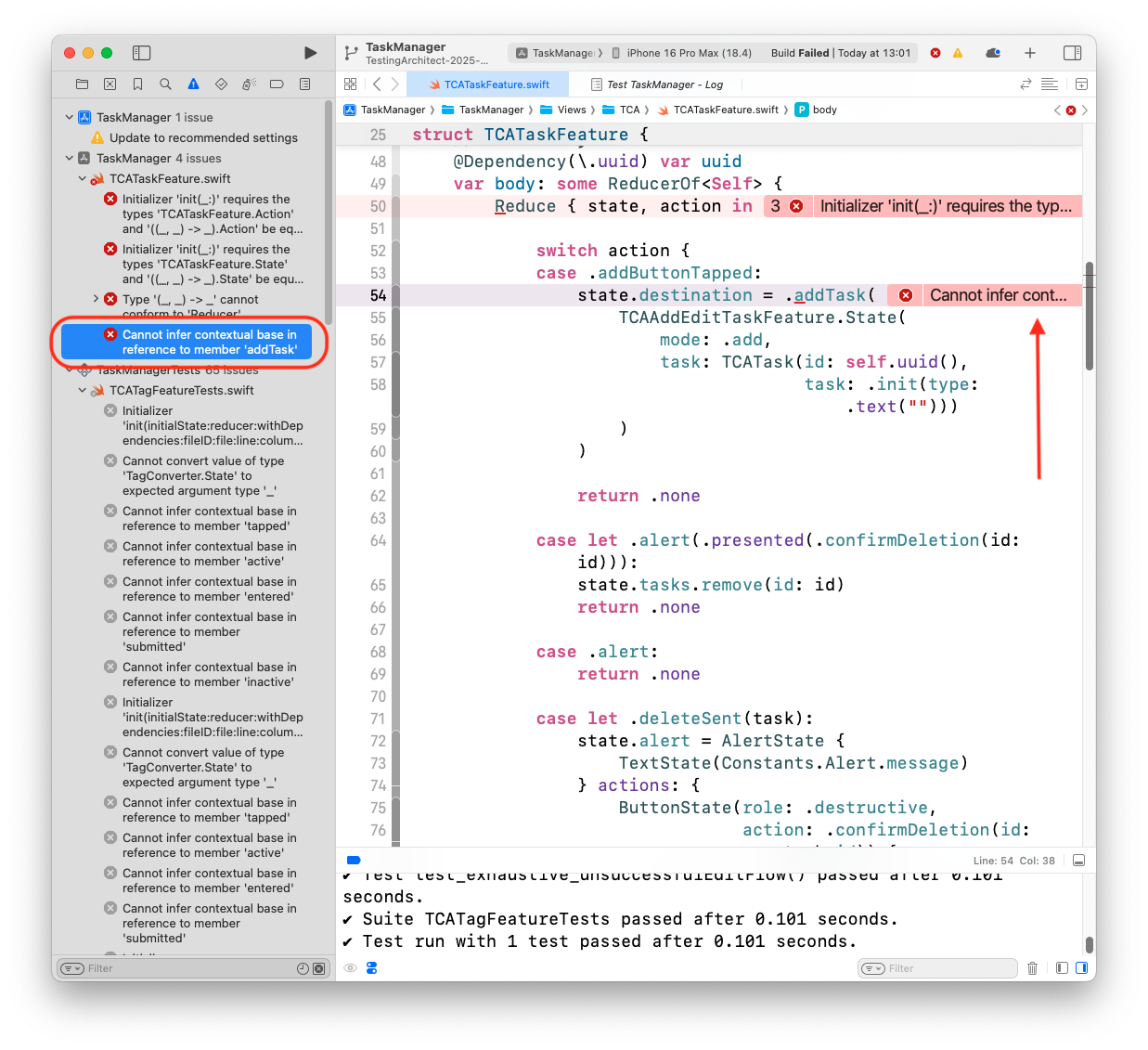
I’ve found that changes in the view or the reducer should be triple checked, when you start finding issues like that that don’t make sense. When I was first playing around with TCA, I found that I was commenting out code until things were stable and then adding elements back piece by piece to try to triage where the issue was introduced.
But that leads us to a decision about which architecture I will be choosing for the TaskManager app.
Why I’m picking TCA to go forward with
While challenges in TCA exist, I don’t think that’s enough to stop me from continuing with TCA for TaskManager going forward. I really like the clarity and the expansiveness of the library. Especially for greenfield SwiftUI projects.
There’s something about the clarity of State and Action, as well as the clarity of having the business logic wrapped in the Reducer.
Next article, we’ll continue with the SwiftUI UI/UX for our TaskManager app with the TCA architecture.